Why is my Shopify payout less than my sales?
Updated November 3, 2026
Your sales report says one number and the bank deposit says a smaller one. Nothing is usually missing. The two reports measure different things. This guide lists the five reasons for the gap, shows how to check one payout by hand, and says what to send Shopify Support when the gap is still unexplained.
Sales are gross, payouts are net: the five things between them
A sales report adds up what customers paid. A payout is what Shopify Payments sends to your bank after it takes things out and after it waits for the right moment to send. Five things sit in between:
- Fees. Shopify Payments takes its processing fee from each order before the money reaches you.
- Refunds. A refund you issued comes back out of a later payout.
- Chargebacks and dispute fees. A disputed payment is pulled back, and a dispute can carry its own fee.
- Reserves and holds. Shopify can keep a share of a payout back, or pause a payout, for a period.
- Timing. A sale made today is not in today's payout. Each payout covers a window that ended before the deposit day.
Only the first one is a cost you can plan around. The others move money across dates or take it back, and each one shows up as its own line in the payout.
Fees: the per-order processing fee and the currency conversion fee
Every card order carries a processing fee. Shopify takes it from the order amount, so the payout line for that order is already net. If you sell in more than one currency, a currency conversion fee can apply as well. Both appear in the Fee column of the payout transactions, not in your sales report.
Fees are the reason a payout is almost always lower than sales, even in a month with no refunds. If you want the exact rate on your plan, read it from your own Shopify billing and Payments pages. Do not work it backwards from one payout.
Refunds and chargebacks land in a later payout than the sale
You sell on the 3rd and refund on the 20th. The sale was in the first payout. The refund is a negative line in whichever payout covers the 20th. Your sales report may show the refund against the original month, while the bank shows it in the later one.
A chargeback works the same way. Shopify takes the disputed amount out of a payout, and a dispute fee can come with it. If the dispute is decided in your favor, the amount can come back in another later payout. The sale, the pull-back and the return can all sit in different payouts. Watch the dates, not just the amounts.
Reserves and holds: money delayed, not money gone
A reserve is a share of your payouts that Shopify keeps for a set period. A hold pauses the payout itself. In both cases the money is still yours, and it is not in the deposit. The reserve line shows as a negative amount in the payout, and a release shows as a positive amount later. The Shopify Payments reserve explained article covers where to see yours, and the Reserve & hold glossary defines each term.
How to check one payout by hand
- In Shopify admin, open Finances → Payouts and click the payout you want to check.
- Export the payout's transactions as a CSV. Open it in a spreadsheet.
- Look at the Type column. You will see types such as charge, refund, adjustment and reserve.
- Add up Amount, Fee and Net for each type. A pivot table or a SUMIF per type does it.
- Check that charges, minus fees, minus refunds, minus any dispute and reserve lines, equals the payout total on the page.
- Compare the payout total with the deposit on your bank statement. They should be the same number for the same payout.
If step 5 works and step 6 does not, the problem is on the bank side: the deposit may combine two payouts, or may not have posted yet.
A worked example: one payout, line by line
These numbers are made up for illustration.
| Order | Type | Amount | Fee | Net |
|---|---|---|---|---|
| #1024 | charge | 120.00 | 3.78 | 116.22 |
| #1025 | charge | 85.50 | 2.78 | 82.72 |
| #1026 | charge | 240.00 | 7.26 | 232.74 |
| #1027 | charge | 60.00 | 2.04 | 57.96 |
| #1025 | refund | −30.00 | 0.00 | −30.00 |
The four charges add up to 505.50 in sales. Fees are 3.78 + 2.78 + 7.26 + 2.04 = 15.86. The refund is 30.00. So 505.50 − 15.86 − 30.00 = 459.64, which is the deposit. A sales report that shows 505.50 is not wrong. It just stops before the three things that came out.
When the gap is still unexplained: what to send Shopify Support
If your hand check leaves a difference you cannot trace, write to Shopify Support with facts they can look up:
- The payout ID and payout date from the payout page.
- The transaction export you checked, attached.
- The amount you expected, the amount you got, and the difference.
- The order numbers or transaction rows you could not account for.
A short, specific message gets a faster answer than "my payout is wrong".
Skip the manual sum
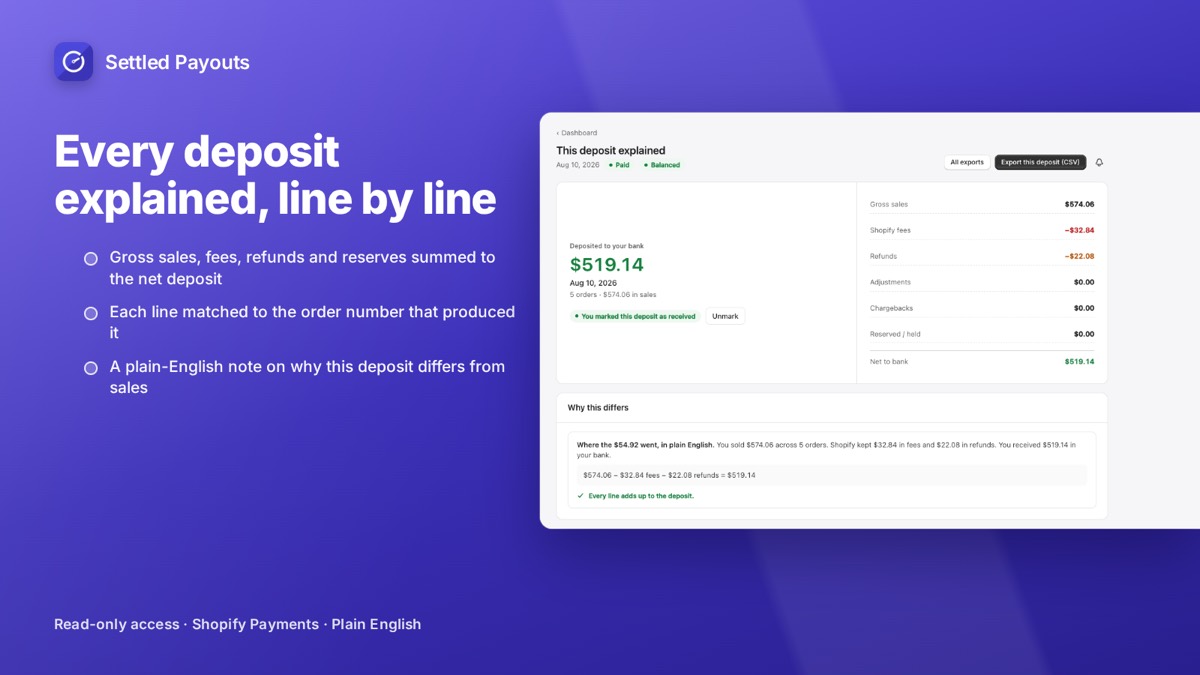
Settled Payouts opens any payout and splits it into sales, fees, refunds, adjustments and reserves, with each line matched to an order number. You see the sum by type without building the pivot table.
The payout breakdown is on every plan. 14-day free trial, no card required. Plans: Starter $19, Growth $39, Scale $79 per month.
Search Settled Payouts on the App Store